If you maintain a WordPress plugin for years, your readme.txt can slowly become much larger than you originally expected.
Every release adds a few lines to the changelog, and after dozens or hundreds of releases, the changelog can become one of the largest sections of the file.
That creates a simple documentation question:
Should you keep the entire changelog inside readme.txt?
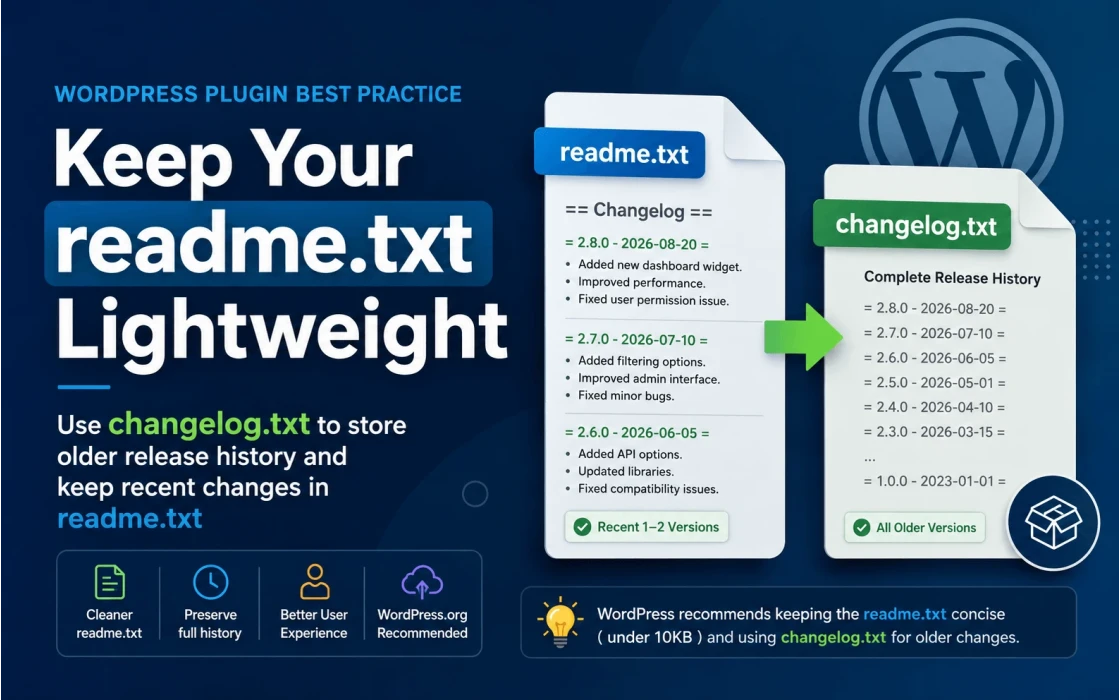
For WordPress.org plugins, the answer is generally no. WordPress recommends keeping the
readme.txt focused and moving older changelog entries into a separate
changelog.txt file.
This gives users access to the complete release history without making the primary plugin
readme unnecessarily large.
Why a WordPress Plugin readme.txt Can Become Too Large
A plugin's readme.txt usually contains much more than a changelog.
It can include the plugin description, installation instructions, FAQ, screenshots,
upgrade notices, configuration information, and other documentation.
The changelog is particularly likely to grow because it is cumulative. A plugin with a long development history may have hundreds of releases, each containing several entries.
For example, a small changelog might look like this:
== Changelog ==

= 2.8.0 - 2026-08-20 =
* Added a new dashboard widget.
* Improved plugin performance.
* Fixed an issue with user permissions.

= 2.7.0 - 2026-07-10 =
* Added new filtering options.
* Improved admin interface.
* Fixed several minor bugs.

= 2.6.0 - 2026-06-05 =
* Added new API options.
* Updated third-party libraries.
* Fixed compatibility issues.
That is perfectly manageable. But imagine maintaining the same format for 50, 100, or 200 releases. Eventually, the changelog can dominate the readme.
WordPress Has a Specific Recommendation
The WordPress Plugin Handbook addresses this situation directly.
According to the official documentation, a readme.txt larger than
10 KB may result in errors. WordPress recommends keeping the readme
brief and to the point.
WordPress also recommends keeping recent release information in
readme.txt and moving older changelog information into a separate file
such as changelog.txt.
The WordPress Plugin Developer FAQ gives a more specific recommendation:
keep the current major release and one major version back in the changelog inside
readme.txt, while moving older versions to changelog.txt.
So while keeping the latest 3 or 4 releases can be a reasonable project convention, the official WordPress guidance is closer to:
- Keep the current major release in
readme.txt. - Keep one major version back in
readme.txt. - Move older release history to
changelog.txt.
What Is changelog.txt?
changelog.txt is simply a separate text file containing the older release
history of your plugin.
It is not a replacement for readme.txt. Instead, the two files have
different purposes.
| File | Purpose |
|---|---|
readme.txt |
Primary plugin documentation and recent release information. |
changelog.txt |
Complete or extended historical record of plugin changes. |
This separation makes the main documentation easier to maintain while preserving the project's historical record.
What Should Stay in readme.txt?
The readme.txt should contain the information a typical plugin user
needs when evaluating, installing, configuring, and updating the plugin.
A typical WordPress.org plugin readme can contain sections such as:
- Description
- Installation
- Frequently Asked Questions
- Screenshots
- Upgrade Notice
- Recent changelog entries
The goal should be simple: keep the information that most users need easy to find.
What Should Move to changelog.txt?
Once a release becomes sufficiently old, its detailed change history can be moved
from readme.txt to changelog.txt.
For example, suppose a plugin is currently at version 5.4.0.
Your readme.txt might contain recent versions such as:
== Changelog ==

= 5.4.0 =
* Added a new dashboard module.
* Improved plugin performance.
* Fixed an issue with user permissions.

= 5.3.0 =
* Added new filtering options.
* Improved the admin interface.
* Fixed several minor bugs.

= 5.2.0 =
* Added new API options.
* Updated third-party libraries.
* Fixed compatibility issues.
Older releases can then be moved into:
changelog.txtThat file can contain the complete historical record:
Changelog
=========

= 5.4.0 =
* Added a new dashboard module.
* Improved plugin performance.
* Fixed an issue with user permissions.

= 5.3.0 =
* Added new filtering options.
* Improved the admin interface.
* Fixed several minor bugs.

= 5.2.0 =
* Added new API options.
* Updated third-party libraries.
* Fixed compatibility issues.

= 5.1.0 =
* Added new settings.
* Improved compatibility.

...

= 1.0.0 =
* Initial release.
Why Not Simply Delete Old Changelog Entries?
Old release information can still be useful.
A user troubleshooting an older installation may want to know when a particular bug was fixed. A developer investigating a compatibility issue may need to understand when a behavior changed. A contributor joining a mature project may also benefit from seeing the project's development history.
Moving old entries to changelog.txt gives you a better compromise:
- The complete history is preserved.
- The primary readme stays relatively small.
- Recent changes remain visible to users.
- Long-term maintenance becomes easier.
- You avoid turning
readme.txtinto an enormous historical document.
In other words, archive the history instead of deleting it.
Is changelog.txt Displayed on WordPress.org?
This is an important distinction.
WordPress.org uses readme.txt as the primary source for the plugin
directory page.
A separate changelog.txt is not automatically rendered as the changelog
section of the WordPress.org plugin page.
The WordPress Plugin Developer FAQ specifically notes that
changelog.txt will not be visible within the WordPress.org Plugin Directory.
That does not make the file useless. It serves as an additional historical document that can be included with the plugin and made available to developers or users who want the complete history.
The important point is that readme.txt remains the file that should contain
the changelog information you want users to see directly on the WordPress.org plugin page.
A Practical Changelog Strategy for Long-Lived Plugins
For a plugin that is actively maintained for many years, a simple release-history strategy works well.
-
Keep recent releases in
readme.txt. -
Move older releases to
changelog.txt. -
Keep the complete history in
changelog.txt. - Continue adding new releases to the appropriate changelog.
-
Periodically trim older entries from
readme.txt.
For example:
plugin/
├── plugin.php
├── readme.txt
├── changelog.txt
├── uninstall.php
├── includes/
├── admin/
├── public/
└── assets/
This is especially useful for mature plugins that have accumulated years of release notes.
Should You Keep 3 or 4 Releases in readme.txt?
You can, but it is important to distinguish between your own documentation policy and WordPress's official recommendation.
If your plugin releases frequently, keeping the latest three or four releases can make the changelog easier for users to scan. There is nothing inherently wrong with that approach as long as the readme remains concise and within WordPress expectations.
However, WordPress's Plugin Developer FAQ recommends keeping the current major release and one major version back, rather than specifying a fixed number such as three or four releases.
Therefore, a good policy could be:
readme.txt
-----------
Current major release
Previous major release

changelog.txt
-------------
Everything older
Or, if your release cycle is very frequent:
readme.txt
-----------
Latest 3–4 meaningful releases

changelog.txt
-------------
Complete historical changelog
The second approach can work well as a project-level convention, while the first more closely follows the specific WordPress recommendation.
Use a Consistent Changelog Format
Moving the changelog to another file is only half of the job. The changelog itself should also be consistent.
Each release should clearly identify the version and, ideally, the release date:
= 3.4.0 - 2026-08-20 =

* Added: New dashboard filtering options.
* Improved: Admin page performance.
* Fixed: Permission issue for certain user roles.
Use clear language that explains the impact of a change rather than only describing an internal implementation detail.
For example, this:
* Optimized query in wp_cbx_data table.is less useful to most users than:
* Improved performance when loading large datasets.A good changelog should help both technical and non-technical users understand what changed and why it may matter.
Consider Using Semantic Versioning
A changelog becomes much more useful when version numbers communicate the type of change.
Semantic Versioning generally follows:
MAJOR.MINOR.PATCH- MAJOR — potentially breaking changes.
- MINOR — new functionality that remains backward compatible.
- PATCH — backward-compatible bug fixes and smaller corrections.
WordPress recommends Semantic Versioning for plugin release management, although it does not enforce it for plugin directory tags.
A consistent versioning strategy makes your changelog easier for both users and developers to understand.
Don't Confuse readme.txt with Your Full Documentation
Another useful way to think about this is that readme.txt should not
become the entire documentation system for your plugin.
The readme is particularly important for WordPress.org, but a mature plugin may also have:
- Online documentation
- Installation guides
- Developer documentation
- API documentation
- Migration guides
- Release announcements
- Support articles
- A complete historical changelog
This makes it easier to give each document a clear purpose instead of putting everything into one file.
What About changelog.md?
In the broader software-development ecosystem, CHANGELOG.md is extremely
common.
Many open-source projects use Markdown for their complete release history, and the
Keep a Changelog format is widely used.
For a WordPress.org plugin, however, readme.txt has a special role.
WordPress specifically expects and prioritizes the plugin readme format for the
Plugin Directory.
WordPress documentation also recommends changelog.txt as the separate
file for older changelog information.
So if your goal is specifically to follow the WordPress plugin ecosystem's
recommendation, changelog.txt is a sensible choice.
If your project also has a GitHub repository, there is nothing stopping you from
maintaining a more developer-oriented CHANGELOG.md there as well.
A Good Workflow for Plugin Developers
For an actively maintained WordPress plugin, you can make changelog maintenance part of your release workflow.
During development
Record meaningful changes as they are made. Don't wait until release day to reconstruct everything from memory.
Before releasing
Group changes under the new version and separate them into useful categories such as Added, Improved, Changed, Fixed, Deprecated, Removed, and Security where appropriate.
Update readme.txt
Add the new release to the top of the changelog and remove sufficiently old entries according to your retention policy.
Update changelog.txt
Keep the complete historical record here so that moving entries out of
readme.txt does not mean losing them.
Validate the readme
Before publishing, run the readme.txt through the official WordPress
readme validator.
This helps identify formatting and compatibility issues before submitting or updating
your plugin.
Example: A Clean WordPress Plugin Repository
A mature plugin could use a structure similar to this:
my-plugin/
│
├── my-plugin.php
├── readme.txt
├── changelog.txt
├── uninstall.php
│
├── includes/
├── admin/
├── public/
├── languages/
└── assets/
The important part is not the exact directory structure. It is the separation of responsibilities:
-
readme.txt— concise, user-facing WordPress.org information. -
changelog.txt— complete historical release information. - Documentation site — detailed guides and technical documentation.
- Version control — source history and development details.
Don't Let Your Changelog Become a Documentation Bottleneck
A changelog is valuable documentation, but that doesn't mean every historical entry
needs to live inside readme.txt.
For a small plugin with only a handful of releases, keeping everything in the readme is perfectly reasonable. But once a plugin has years of releases, separating recent changes from historical changes becomes a much cleaner approach.
WordPress already provides a clear recommendation for this:
keep recent and relevant release history in readme.txt, and move older
entries into changelog.txt.
The Plugin Handbook also warns that readmes larger than 10 KB may result in errors, which makes keeping the file focused even more important.
For long-running WordPress plugins, this small documentation practice can make release management easier, keep the WordPress.org page focused, and preserve the complete history of the project at the same time.
Building and Maintaining WordPress Plugins?
Good plugin development is not only about writing code. Release management, documentation, compatibility, and maintainability matter just as much when a plugin is expected to live for years.
Keep your readme.txt focused, preserve your complete release
history in changelog.txt, and make every release easier for
your users to understand.